

SoloDesk for Fiduciaries
Monday, 09:00.
You know where to start.
SoloDesk brings your clients' bookkeeping and your practice's work into one system. The Portfolio gives you one view of the work requiring your attention across every client: documents to process, payments to reconcile and entries to review. From there, you can open the relevant work directly. When a client asks a question in SoloDesk, it stays visible alongside that work. You choose where to start and keep track of what is still trailing.
Working together
Your clients bring different expectations.
-
"I'll send you the documents."
You handle the bookkeeping and follow up on anything missing.
-
"I take care of the invoices."
They manage their sales; you look after the rest of the accounts.
-
"I've done the books. Can you check them?"
You review their work and help put any mistakes right.
-
"Where do we stand?"
You haven't heard from them in months. Before you can answer, you need to collect the missing documents.
Changing software
A switch has to be
worth the effort.
Your clients already know what they handle and what they leave to you. Introducing new software can mean teaching them another way to send documents, raise invoices or check their figures. For the clients who need that support, your team becomes the first point of contact while the usual work continues.
A new system needs to earn its place in your practice. It should lighten the everyday workload enough to repay the hours spent getting familiar with it.
Working with SoloDesk
Keep the working arrangement that suits each client.
SoloDesk supports the division of work you agree with each client.
-
You handle the bookkeeping.
They continue to send documents by email or hand over paper. Your team handles the bookkeeping in SoloDesk; the client does not need to use the software.
-
You share the work.
Clients can issue invoices or do their own bookkeeping in SoloDesk, with your team reviewing their work. Once you validate an entry, it is protected from client edits.
-
They send documents and follow the figures.
Clients can upload documents, answer your questions and view their reports. You maintain the books and control changes to the accounting records.
Less routine work
SoloDesk reads.
You decide.
A new system is worth learning when it takes recurring work off your hands.
SoloDesk reads documents, creates accounting entries and matches bank payments, whether the bookkeeping is handled by your team or shared with a client. You review the results and make the decisions. Repeated data entry, payment searches and corrections all add to the cost of serving a client.
Reducing that work frees your team to focus on the accounting that needs their judgment.
-
01
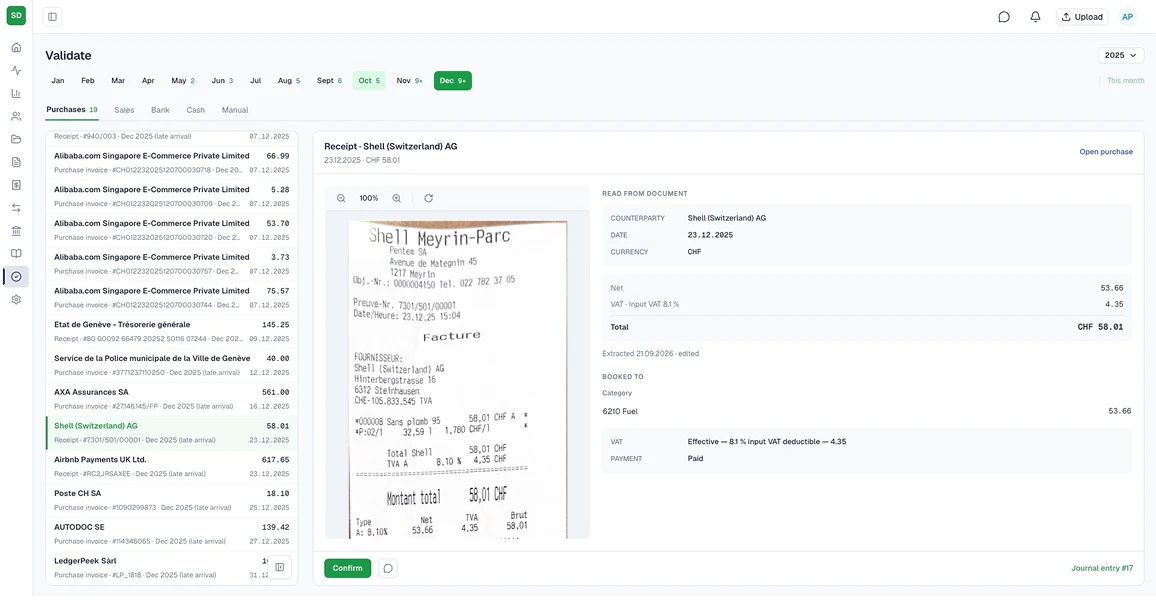
Documents become accounting entries. You control the result.
SoloDesk extracts document data, runs checks and prepares entries in the books. When a decision is needed, you see the confidence level and can confirm the suggestion or inspect the details. SoloDesk remembers your decisions and applies them to similar documents.
How Document Intelligence works → -
02
Bank payments are matched.
SoloDesk matches payments from bank statements to the relevant entries. Unclear cases wait for your decision.
See bank reconciliation → -
03
Reviewed work stays protected.
Once you validate an entry, it is protected from client edits. The record shows who validated it and when.
See validation → -
04
You both see what the question is about.
You and your client can link to any document, accounting entry, transaction or payment directly in the conversation. A click takes either of you straight to the item being discussed.
See the conversation →
These tools support the work within each client's accounts. The Portfolio brings the work requiring your attention across all clients into one view.
The Portfolio
Keep every client in view.
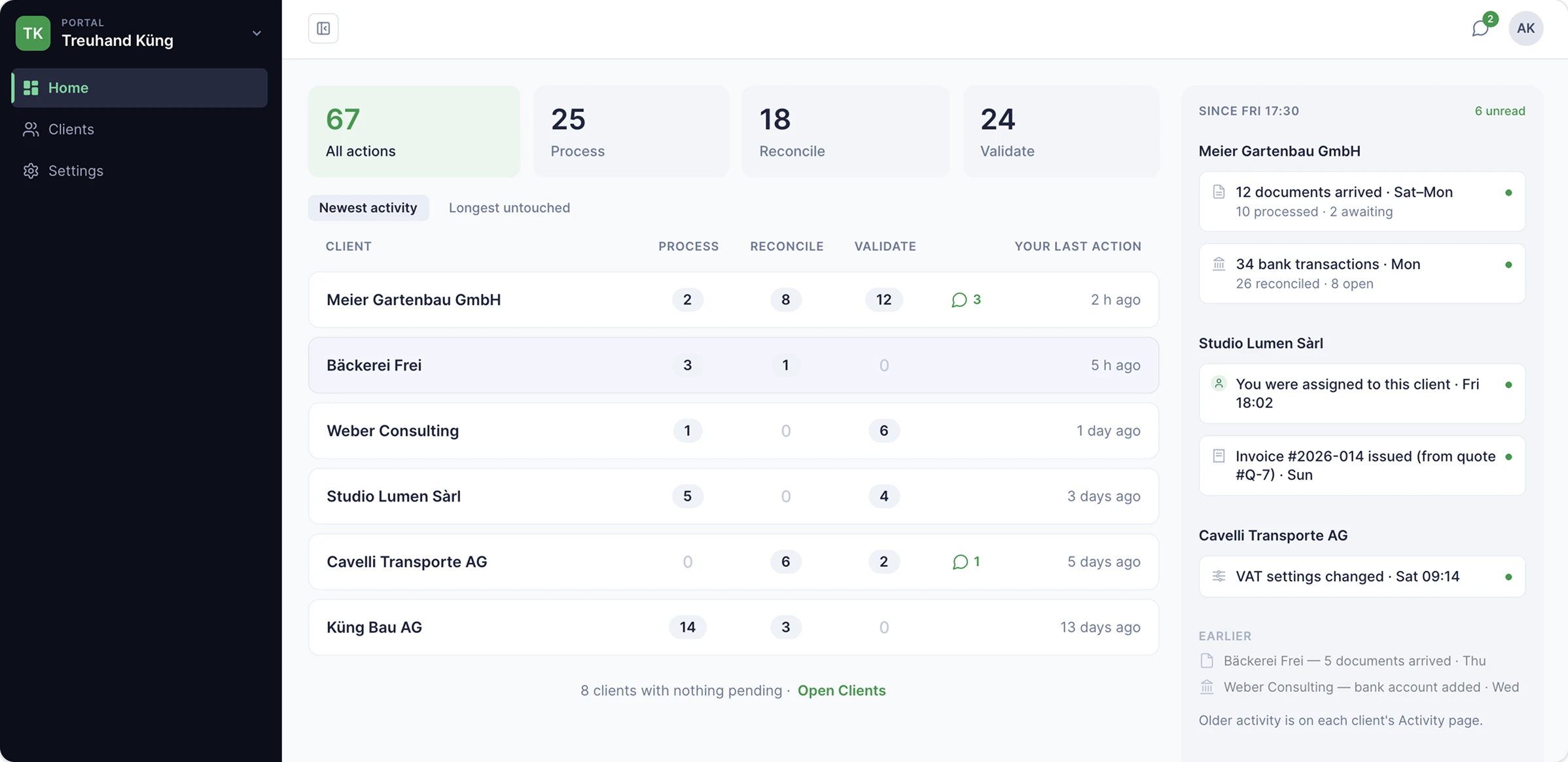
The Portfolio brings your client work, updates and conversations into one workspace, visible only to your practice. You can see where your attention is needed and choose what to work on next.
-
Spot the clients worth checking in on.
Even clients with no pending work stay in your client list. Sort by your practice's last recorded activity on each client, oldest first, to see whom you may want to follow up with.
-
See what needs action and what has changed.
Your work list shows what needs action. Client updates are grouped separately, and conversations have their own place. An unread message keeps a client in view even when there is no other work waiting.
-
Keep earlier history separate from current work.
When you take on a client, entries from before your agreed start date for handling their accounts sit in a separate Backlog. You can review that history when you need it.
A client modifies an invoice you reviewed last month. You now have to find what changed and check the figures again.
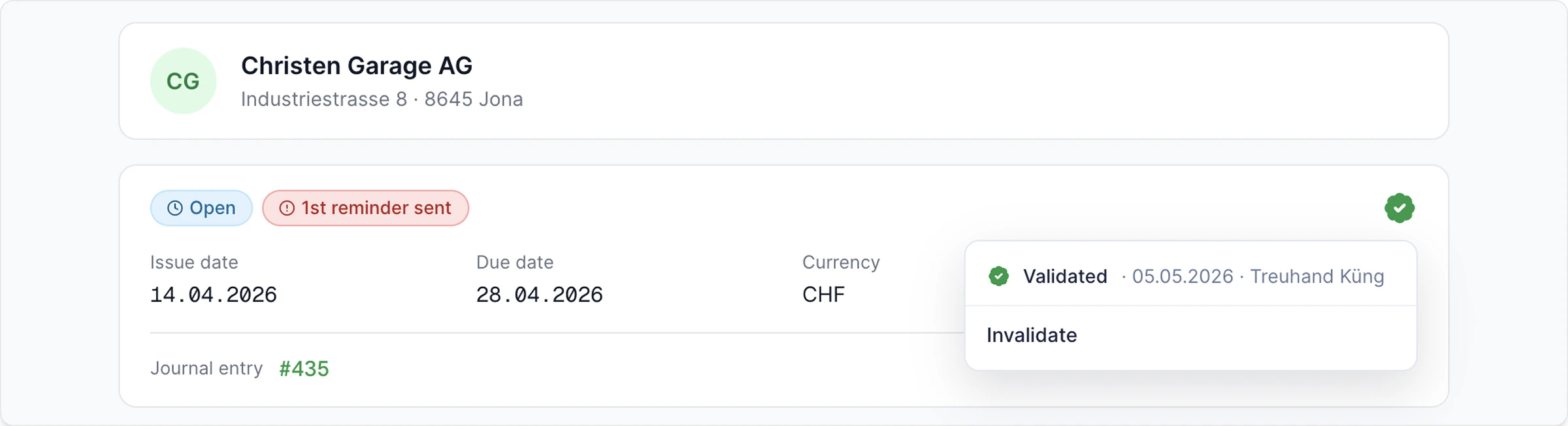
In SoloDesk, validating an entry records your review and protects it from client edits. A stamp shows who validated it and when, visible to both your team and the client. The client can still view the entry and continue working on the rest of their books.
If something needs correcting, the client can raise it in the conversation with a reference to the entry. Your practice handles the change, and the validation stamp is updated.
The conversation
Your team can pick up where you left off.
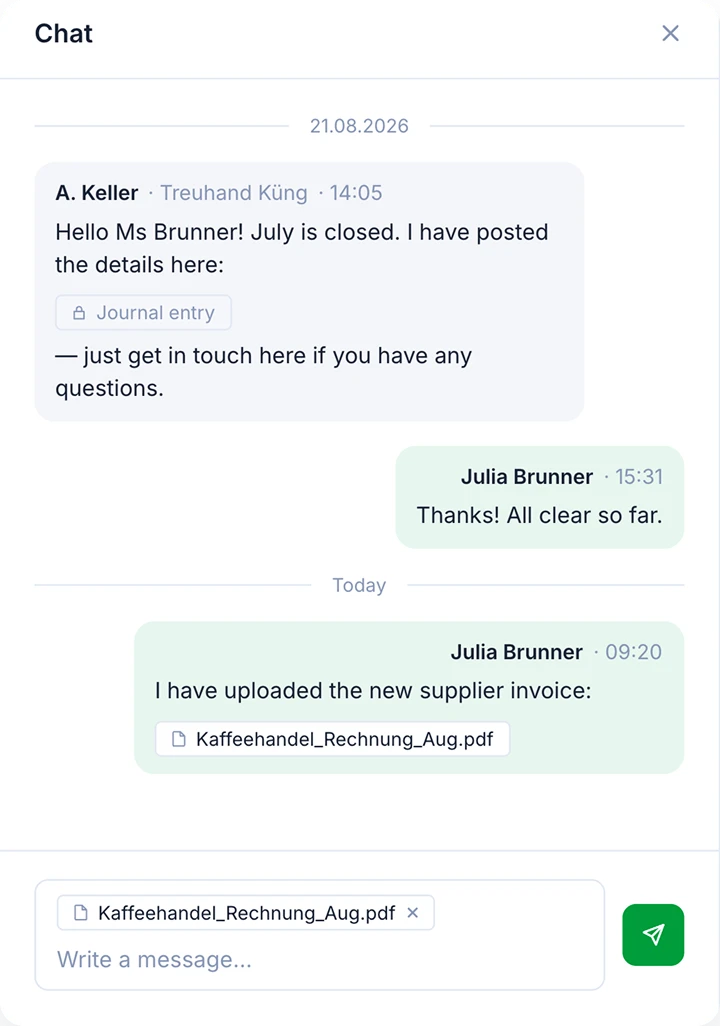
For clients working with you in SoloDesk, questions and replies stay in one conversation, shared with the colleagues handling their account. Either side can refer directly to an invoice, payment or accounting entry, keeping the discussion connected to the work.
A colleague is away when the client follows up on a question. The person covering can read the earlier exchange, open the referenced documents or entries and continue the discussion.
The rhythm stays yours: your team chooses when to respond.
Swiss accounting
Swiss books. Foreign currencies included.
-
Swiss accounting tools.
The Swiss SME chart of accounts, QR-bills and VAT reporting under the effective method, mapped to the official federal return.
-
Multi-currency accounting.
Work with accounts, invoices and payments in foreign currencies. SoloDesk applies the relevant exchange rates to invoice and payment entries, and automatically books the exchange differences between them so the entries balance.
-
Supporting detail you can inspect.
Review entries alongside the invoices, receipts or bank transactions they relate to.
Built by a practice
SoloDesk grew out of 12 years of running an accounting practice, serving 150+ client businesses and processing 100'000+ documents. Its starting point is the work a practice does every day.
Switching
We'll plan the move with you.
Tell us which systems you and your clients use today. Together, we'll work through what can be transferred from the existing books and documents, which clients to start with and a timetable that fits your workload.
You agree the plan before the changeover begins.
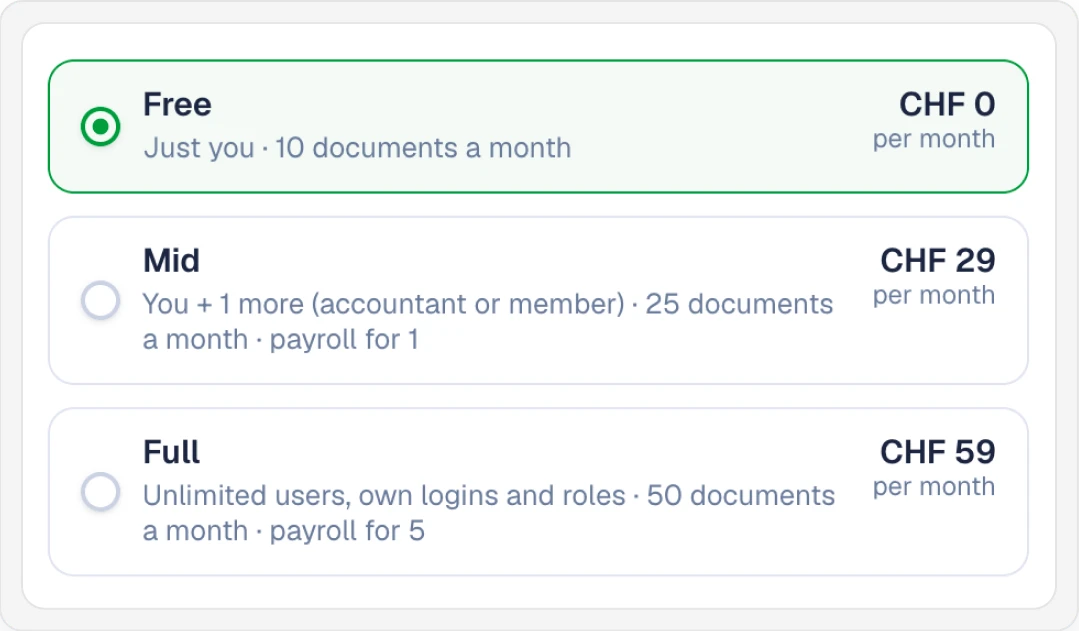
What it costs
The Portfolio is free for your practice.
Bring your team together around your client work, review queues and conversations. Adding accountants to your practice is free.
Each client company has its own SoloDesk plan at the standard price. Companies on the Free plan cost nothing.