

Create a complete invoice with a Swiss QR-bill for free.
Fill in the details and SoloDesk builds the whole invoice. Your invoice is ready to download and send.
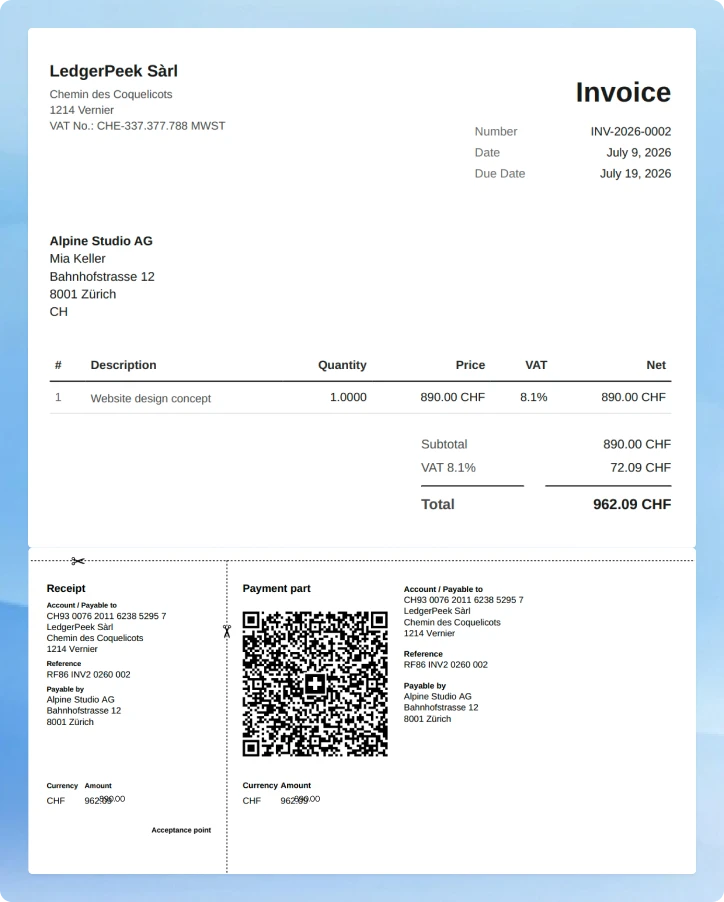
How our invoice generator works
- 01
Open the generator and fill in the details
Create your free account in a minute, then enter your business and client details, your IBAN, and what you're billing for. SoloDesk builds a complete invoice, QR-bill included.
- 02
Get your invoice
Click 'Create an invoice' and SoloDesk saves the complete invoice to your account.
- 03
Send it and get paid
Download and send it to your client. They scan the QR code and pay with one tap.
The simplest invoice generator in Switzerland
-
More than a payment slip
An online banking tool produces only a payment slip, while SoloDesk helps you prepare a complete invoice that includes a breakdown of services, a unique invoice number, a due date, and the QR-bill your client scans to pay.
-
Two minutes, done
You fill in your details, click 'Create an invoice', and the complete invoice is saved to your account. There aren't any extra steps to complete.
-
Paid without friction
Your client scans the QR code in their banking app, and the amount, payment reference, and your details are filled in automatically. One tap to pay.
-
Free, no limits
Creating invoices in SoloDesk is free. Make as many as you need, each with any number of services or products. You're never charged.
Invoice tracking, follow-ups, bookkeeping, and more
When you need
more than an invoice
Invoicing is one part of SoloDesk. The app also tracks which invoices are sent, paid, or overdue, matches payments as they land, drafts follow-ups when a client is late, and keeps your VAT current if you're VAT-registered.
Right now you need one invoice. Later you'll want to know which client hasn't paid yet, whether that CHF 3'240 that landed in your bank account this morning matches an invoice, and how much VAT you owe next quarter. Same SoloDesk, on desktop and mobile.
First month free on the Full plan. Every new business gets the full SoloDesk app for one month at no cost — 50 documents, no credit card. After the trial, you choose your plan: Free (CHF 0), Mid (CHF 29/mo), or Full (CHF 59/mo). Your data is preserved either way.
What SoloDesk does after the invoice is sent
The features that turn one invoice into an ongoing business.
-
Invoice tracking
See which invoices are sent, overdue, or paid without opening your bank app.
-
Payments auto-match
When your client pays the QR-bill, the invoice flips to 'Paid' on its own.
-
Reminders
SoloDesk drafts payment reminders for overdue invoices. You send them to your client in one click.
-
Real-time VAT
Every bill, receipt, or invoice updates your VAT total. The amount you owe is always up to date.
-
One screen for everything
Cash position, unpaid invoices, upcoming VAT — all in one place.
-
Access for your accountant
On the Mid and Full plans, invite your accountant to work directly on your books.

Founder
"SoloDesk is built on 12 years of accounting-software development for Swiss businesses — and over 100'000 documents processed. Your data is hosted in Switzerland."
FAQ
Frequently asked questions
- Free: CHF 0 — up to 10 documents/month
- Mid: CHF 29 — up to 25 documents/month
- Full: CHF 59 — up to 50 documents/month